


Eliéser Da Silva Barbosa
-
Posts
8 -
Cadastrado em
-
Última visita
Tipo de conteúdo
Artigos
Selos
Livros
Cursos
Análises
Fórum
Tudo que Eliéser Da Silva Barbosa postou
-

Excel BACKUP automatico mensal da planilha principal em novo arquivo.
Eliéser Da Silva Barbosa respondeu ao tópico de Eliéser Da Silva Barbosa em Microsoft Office e similares
ele so abre em 32 bits. pior q nao sei configurar para abrir em 64 e 32 bits mas sei q tem um codigo na pasta principal q se add Prtsafe ele le em 64bits. queria poder fazer um programa q abrisse em 64 e 32 bits. -
pc gamer i7 7700k
Eliéser Da Silva Barbosa respondeu ao tópico de orlando paixao em Refrigeração e superaquecimento
o watercooler depende que o ambiente do PC tenha temperatura controlada tb, porque senao com o tempo a temperatura do liquido de arrecefimento tb sobe, elevando a media de temperatura. Em outras palavras precisa que o quarto tenha ar condicionado, pois alguma coisa precisa resfriar a "agua". Se essa não é a realidade, entao usar coolers cuidando para que o fluxo de ar fique correto dentro do gabinete é o mais eficiente, mesmo em ambientes mais aquecidos. Mas é superrelevante que cuide da temperatura do qurto onde fica o pc, isso interfere diretamente. -
Excel BACKUP automatico mensal da planilha principal em novo arquivo.
Eliéser Da Silva Barbosa respondeu ao tópico de Eliéser Da Silva Barbosa em Microsoft Office e similares
Para acessar as planilhas vai precisar clicar no botao Banco de Dados e digitar a senha "123". o projeto é em VBA. Cad_Paciente_v3 beta.rar -
Excel BACKUP automatico mensal da planilha principal em novo arquivo.
Eliéser Da Silva Barbosa respondeu ao tópico de Eliéser Da Silva Barbosa em Microsoft Office e similares
Gostei da ideia, mas nao saberia como fazer o codigo. tenho pesquisado códigos na internet e adaptdo a minha necessidade. nao sei construir codigos do zero. -
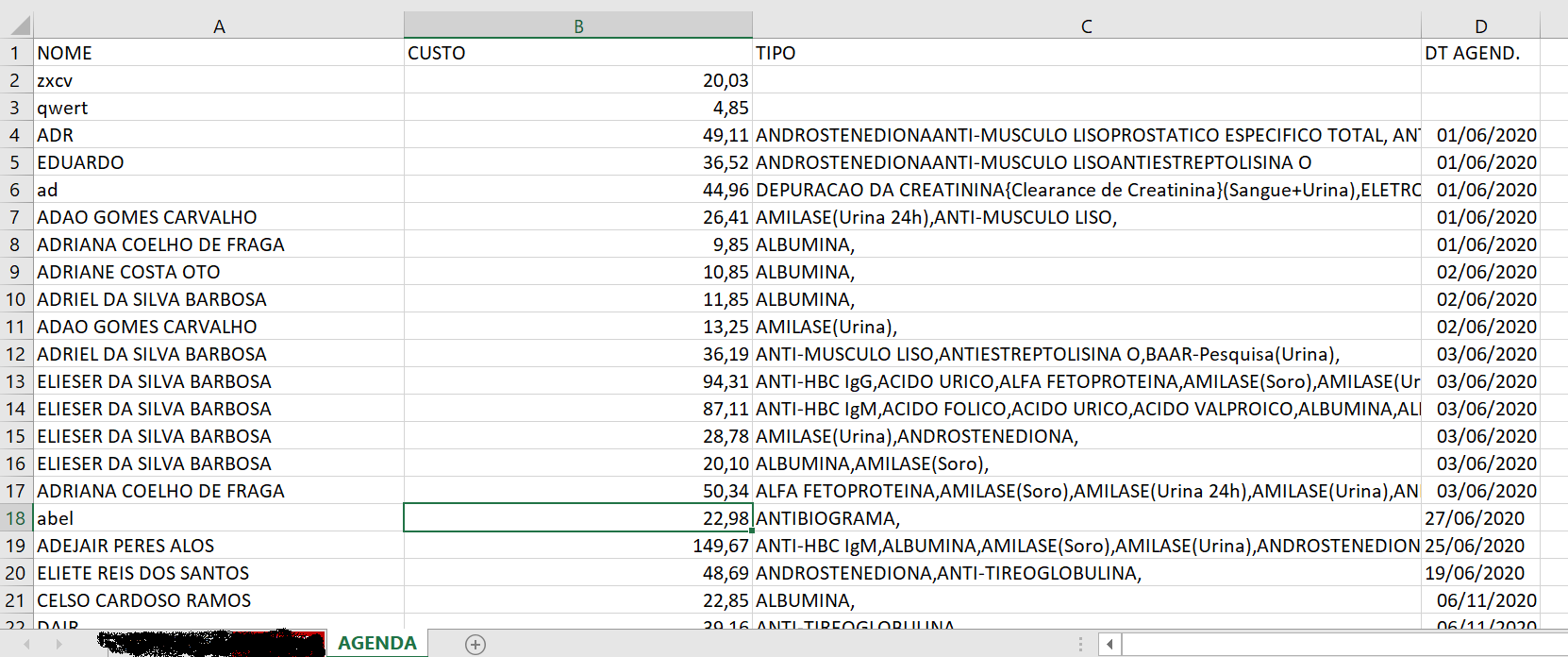
tenho uma pasta de trabalho com varias planilhas e uma delas tem o nome AGENDA. Preciso de um código que crie uma nova planilha automaticamente com o nome do mes que encerrou, sempre que seja inserida uma data com novo mes na planilha AGENDA, Sendo que a planilha AGENDA seja limpa para conter somente os dados do mes atual. Essa nova planilha ficaria com esses dados salvos em um nova pasta de trabalho. A ideia é que ao usar um formulario para criar um agendamento novo em que mude o mes ele faca essa rotina de forma automatica. Eu uso um calendario datapicker para inserir as datas no agendamento. Nao tenho conseguido achar na internet de forma simples, codigos que sirvam para o meu proposito, Estava esquecendo, preciso que o backup fique salvo dentro de um subpasta na pasta do sistema MEUS DOCUMENTOS. Ex: ... \DOCUMENTOS\BACKUPVBA os dados que possuo na planilha estão NO pRINT

-
Compatibilidade de Acer®E15 x SSD Corsair® MP510
Eliéser Da Silva Barbosa respondeu ao tópico de Eliéser Barbosa em HD, SSD e NAS
Ja tenho o ssd citado comprado novo. Comprei para instalar no Desktop mas a placa-mãe nao era compativel. Entao queria apenas saber se seria compativel com o notebook citado. to com o MP510 parado em casa. nao achei no manual do modelo se ele tem uma entrada M2 secundaria, pelo q vi so tem o slot do wifi/bluetooh. queria ver se tem como usar o MP510 no Acer® E5-571-33ZU diretamente em uma entrada M2 ou tenho que usar um adptador sata? e se eu usar o MP510 no note ele vai funcionar? -
Visual Basic Como fazer soma em listview
Eliéser Da Silva Barbosa respondeu ao tópico de Eliéser Barbosa em Programação - outros
alguem poderia dar outra maozinha aq? -
Visual Basic Como fazer soma em listview
Eliéser Da Silva Barbosa respondeu ao tópico de Eliéser Barbosa em Programação - outros
Como ainda faz parte do mesmo formulario to agora com um problema no codigo. Preciso fazer duas coisas: 1-No Codigo16 a linha "ListInput.AddItem Cells(a, 2)" que vem logo após ao "Then" dentro do "If" diz que precisa ser depurada e nao sei como resolver. Esse codigo faz a entrada de dados "nome " da Plan4 (sheet PACIENTES) no listinput. Na verdade preciso de um codigo de texto autocomplete que nao demore a carregar, mas que ao mesmo tempo permita que eu visualize enquanto digito quais os nomes de paciente que vão correspondendo conforme o que esta sendo digitado (seria melhor que quando ao clicar em cima da opcao com o ponteiro do mouse ela termine de preencher o campo). Também necessito apagar o nome enquanto escrevo e mesmo depois de escrito usando apenas o Backspace(Parece o a funcao backspace no codigo nao funciona???). Neste caso usei uma TextBox para escrever e uma ListBox para visualizar. Mas se tiverem outra ideia estou aberto a sugestoes. 2-To achando que no meu codigo tem funcoes que nao estão sendo usadas e só esao gerando conflito, mas nao sei detectar. Alguem pode dar uma ajuda nisso? O objetivo deste formulario é criar uma agenda de marcacao de exames laboratoriais e lanca-los na planilha para depois resgatar estes dados para imprimir e/ou visualizar o relatorio em pdf, que vai ser outro problema que terei que resolver. Pois como nao sei fazer de outra forma adicionei virgulas após o nome de cada exame na planilha (o que deixa na listview visualmente desagradavel), mas pelo menos assim é lancado de alguma forma eu possa dividir as palavras epois e lanca-las como exames de forma individual. Option Explicit 'Digite aqui o intervalo a ser autocompletado Private Const r As String = "B1:B1000000" Private sInput As String Dim NomePct As Range Dim flParar As Boolean 'Faz parar a pesquisa dos dados digitados 'Código1 Private Sub BtnSavSelec_Click() 'Grava o nome e a soma dos exames na planilha MARCACAO Dim Nome As String Dim Lab As String Dim SomaI As Double Dim Linha As Variant Dim dia As String, mes As String, ano As String, Agenda As String dia = Calendario1.Day mes = Calendario1.Month ano = Calendario1.Year Agenda = DateValue(dia & "/" & mes & "/" & ano) Linha = 2 Nome = txtInput SomaI = TextSoma Lab = TextLab While Plan5.Cells(Linha, 1).Value <> "" Linha = Linha + 1 Wend Plan5.Cells(Linha, 1).Value = Nome Plan5.Cells(Linha, 2).Value = SomaI + Linha Plan5.Cells(Linha, 3).Value = Lab Plan5.Cells(Linha, 4).Value = Agenda MsgBox "Cadastrado com sucesso...", 64, "Dados" Me.txtInput = "" Me.TextSoma = "" Me.TextLab = "" Call CustoM End Sub 'Código2 Private Sub ListView1_Click() 'Impede a Listview de ficar carregando a cada clique Static B As Boolean, C As Boolean If B = False Then CarItens B = True 'ElseIf C = False Then AddLab 'C = True 'End If Call SomarItens Call AddLab End Sub 'Código3 Private Sub BtnLabPesqPact_Click() 'Abre o formulario de pesquisa dde pacientes. Unload Form_lab form_pesq.Show End Sub 'Código4 Private Sub txtInput_KeyDown(ByVal KeyCode As MSForms.ReturnInteger, ByVal Shift As Integer) 'Ao digitar deletar ou backspace o sistema limpa a variável de controle para pesquisar novamente 'Limpa a variável de controle If (KeyCode = vbKeyBack) Or (KeyCode = vbKeyDelete) Then flParar = True Else flParar = False End If If (KeyCode = 13) Then ActiveCell.Value = Form_lab.txtInput.Text Form_lab.txtInput.Value = vbNullString Form_lab.Hide End If End Sub 'Código5 Private Sub txtInput_Change() 'Faz a busca dos nomes Dim Texto As String Dim Pesquisa As String ListInput.Visible = True Pesquisa = txtInput.Text NomePct.Value = txtInput.Value Texto = NomePct.AutoComplete(txtInput.Text) If Len(Texto) > 0 Then With txtInput .Text = Texto .SelStart = Len(Pesquisa) .SelLength = Len(Texto) End With End If Call LstInpView End Sub 'Codigo6 Private Sub txtInput_Enter() Set NomePct = Sheets("PACIENTES").Range("B1048576").End(xlUp).Offset(1, 0) End Sub 'Codigo7 Private Sub txtInput_Exit(ByVal Cancel As MSForms.ReturnBoolean) NomePct.ClearContents End Sub 'Codigo8 Private Sub txtInput_KeyPress(ByVal KeyAscii As MSForms.ReturnInteger) 'Faz com que ao digitar todas as letras fiquem em maiusculas, permita apagar usando backsspace e emula a funçao da tecla TAB* (*Eu acho que faz a funcao TAB pelo menos) KeyAscii = Asc(UCase(Chr(KeyAscii))) Select Case KeyAscii Case 8 'Aceita o BACK SPACE Case 13: SendKeys "{TAB}" 'Emula o TAB End Select End Sub 'Codigo9 Private Sub form_lab_Click() 'Permite que apareca a listInput somente quando comecar a digitar algo na txtInput ListInput.Visible = False End Sub 'Codigo10 Private Sub UserForm_Initialize() Call Tags 'Cria tags identificando cada coluna Call CarItens 'Carrega o listview com os dados da planilha EXAMES Call SomarItens 'Realiza a soma dos itens selecionados no formulario Call CustoM 'Apresenta a soma dos exames marcados no mes corrente End Sub 'Codigo11 Private Sub Tags() 'Cria tags para as colinas da listview With ListView1 .Gridlines = True .View = lvwReport .FullRowSelect = True .MultiSelect = True .ColumnHeaders.Add Text:="SIGLA", Width:=75, Alignment:=0 .ColumnHeaders.Add Text:="NOME", Width:=530, Alignment:=0 .ColumnHeaders.Add Text:="VALOR", Width:=75, Alignment:=0 End With End Sub 'Codigo12 Private Sub CarItens() 'Carrega os itens na listview Dim Linha, linhalist As Integer Dim Ultimalinha, Lista As Variant linhalist = 0 Linha = 2 ListView1.ListItems.Clear Plan3.Select With Plan3 While Cells(Linha, 1).Value <> "" Ultimalinha = .Cells(Rows.Count, "a").End(xlUp).Row With ListView1 Set Lista = ListView1.ListItems.Add(Text:=Cells(Linha, "a").Value) Lista.ListSubItems.Add Text:=Cells(Linha, "b").Value Lista.ListSubItems.Add Text:=Format(Cells(Linha, "c").Value, "R$ #0.00") End With linhalist = linhalist + 1 Linha = Linha + 1 Wend End With End Sub 'Codigo13 Private Sub SomarItens() 'Soma itens selecionados no formulario Dim Linhas As Integer Dim Soma As Double Dim i As Variant With Form_lab Linhas = .ListView1.ListItems.Count For i = 2 To Linhas If .ListView1.ListItems(i).Selected = True Then Soma = Soma + .ListView1.ListItems(i).ListSubItems(2) 'Valor End If Next TextSoma.Value = Format(Soma) End With End Sub 'Codigo14 Private Sub CustoM() Dim C As Double C = TextSomaM C = WorksheetFunction.Sum(Plan5.Range("B2:B200")) 'Faz a soma dos exames marcados no mes e lanca no textbox TextSomaM.Value = Format(C, "Currency") 'Formata o textbox no formato Moeda If Me.TextSomaM.Text > 2500 Then 'Cria uma condicao trocando a cor da fonte para vermelho Me.TextSomaM.ForeColor = &HFF& End If End Sub 'Codigo15 Private Sub AddLab() 'Permite selecionar o nome dos exames na listbox e enviar para uma textbox que envia os dados para a planilha Dim Carregar As Variant Dim Lab As Variant Dim Linhas As String With Form_lab Linhas = .ListView1.ListItems.Count For Carregar = 2 To Linhas If .ListView1.ListItems(Carregar).Selected = True Then Lab = Lab + .ListView1.ListItems(Carregar).ListSubItems(1) 'Nomes dos exames End If Next TextLab.Value = Lab End With End Sub 'Codigo16 Private Sub LstInpView() 'Colocar uma call em Private Sub txtInput_Change Dim a As Integer Plan4.Select ListInput.Clear ListInput.Visible = True For a = 1 To Range("B1000000").End(xlUp).Row If UCase(Left(Cells(a, 2), Len(txtInput.Text))) = UCase(txtInput.Text) Then ListInput.AddItem Cells(a, 2) End If Next a End Sub Cad_Paciente_v2.2.rar

Sobre o Clube do Hardware
No ar desde 1996, o Clube do Hardware é uma das maiores, mais antigas e mais respeitadas comunidades sobre tecnologia do Brasil. Leia mais
Direitos autorais
Não permitimos a cópia ou reprodução do conteúdo do nosso site, fórum, newsletters e redes sociais, mesmo citando-se a fonte. Leia mais